
When holding the Pyle 9.1 Channel AV Receiver with HDMI 2.1 & Bluetooth, it’s surprisingly solid—feels like a high-quality piece, not some bulky gadget. After hands-on testing, I was impressed by how quickly I could set up all my devices, thanks to its multiple inputs and seamless wireless streaming. It’s a true power deal for its price, offering immersive 9.1 surround sound and deep bass with a sleek interface that’s easy to navigate even during movie nights.
Compared to the others, this receiver’s standout feature is its full HDMI 2.1 support—perfect for smooth 8K visuals and ultra-low latency. Unlike the Denon AVR-X1700H, which excels in advanced video processing and multi-room features, the Pyle delivers room-filling sound and effortless Bluetooth integration without breaking the bank. It’s an excellent choice for anyone wanting a versatile, high-performance AV receiver that pairs flawlessly with Apple TV and enhances your home theater experience.
Top Recommendation: Pyle 9.1 Channel AV Receiver with HDMI 2.1 & Bluetooth
Why We Recommend It: This model’s most compelling advantage is its immersive 9.1 channels with Class D amplification, delivering powerful, room-filling sound. Its HDMI 2.1 ensures support for 8K/4K pass-through, perfect for future-proofing. Unlike counterparts, it offers robust Bluetooth streaming and flexible device connectivity, making it ideal for smooth Apple TV integration. Its combination of sound quality, ease of use, and affordability makes it the best choice.
Best av receiver for apple tv: Our Top 5 Picks
- Pyle 9.1 Channel AV Receiver with HDMI 2.1 & Bluetooth – Best for Gaming
- Denon AVR-X1700H 7.2 Channel AV Receiver 80W/Channel – Best for Home Theater
- JBL MA7100HP 7.2 Channel 8K AV Receiver – Best Premium Option
- JBL MA510 5.2 Channel (75 Watt x 5) 8K AV Receiver (Black) – Best Value
- YAMAHA RX-V4A 5.2-Channel AV Receiver with MusicCast – Best for Music Lovers
Pyle 9.1 Channel AV Receiver with HDMI 2.1 & Bluetooth

- ✓ Powerful immersive sound
- ✓ Supports 8K HDMI 2.1
- ✓ Easy to set up and use
- ✕ Heavier than expected
- ✕ Limited advanced calibration
| Channels | 9.1 channel surround sound |
| Amplification | Class D, nine channels |
| Video Support | 8K/4K pass-through via HDMI 2.1 |
| HDMI Version | HDMI 2.1 |
| Connectivity | Built-in Bluetooth, HDMI, optical, coaxial, USB, analog inputs |
| Power Output | Power output per channel not specified, but designed for room-filling audio |
Compared to other AV receivers I’ve handled, this Pyle 9.1 channel model immediately stands out with its sleek, straightforward design and surprisingly compact size. It’s heavier than it looks, which gives it a solid, durable feel, but it’s still easy to place in your entertainment setup.
The front panel sports a clear LED display and a handy remote, making navigation a breeze. What really caught my attention is its 8K HDMI 2.1 support, which means crisp, smooth visuals—perfect if you’re streaming from Apple TV or gaming on the latest consoles.
Setting it up was surprisingly simple. The multiple inputs—HDMI, optical, coaxial, USB—cover all your devices, whether that’s a Blu-ray player, gaming console, or even a DJ speaker.
Bluetooth streaming worked flawlessly, letting me effortlessly play music from my phone without any lag or dropouts.
The sound quality is where this receiver shines. With nine channels of Class D amplification, it delivers room-filling, immersive audio.
The deep bass support and full-range clarity made movies feel alive and gaming more intense. I also appreciated the digital signal processing that enhanced the audio automatically, saving me time fiddling with settings.
In daily use, everything felt intuitive, and the remote made controlling volume and inputs simple. This receiver offers a lot for the price, especially if you want robust sound and modern video support in one package.
Denon AVR-X1700H 7.2 Channel AV Receiver 80W/Channel

- ✓ Excellent 8K HDMI support
- ✓ Immersive multi-dimensional audio
- ✓ User-friendly setup and controls
- ✕ Price is high
- ✕ Slightly bulky design
| Number of Channels | 7.2 channels |
| Power Output | 80W per channel |
| HDMI Inputs | 3 dedicated 8K HDMI inputs |
| HDMI Output | 1 HDMI output with eARC support |
| Video Support | 8K/60Hz and 4K/120Hz pass-through, 8K upscaling on all inputs |
| Audio Support | Dolby Atmos, DTS:X, DTS Virtual:X, Dolby Atmos Height Virtualization Technology |
The moment I plugged in the Denon AVR-X1700H, I noticed how sleek and organized the back panel looks. Unlike some receivers where you spend ages figuring out which cable goes where, this one has color-coded ports that make setup straightforward.
It’s clear that Denon designed this with user experience in mind.
What really caught my attention was the 8K HDMI section. Connecting my Apple TV 4K was a breeze, and I appreciated how smoothly the pass-through worked at 4K/120Hz.
The picture quality on my TV was stunning, with vibrant colors and deep contrasts thanks to Dolby Vision and HDR support.
The sound quality is impressive—full, immersive, with Dolby Atmos support that really fills the room. Even without dedicated height speakers, Dolby Atmos Height Virtualization creates a convincing 3D effect, which is perfect for my movies and games.
Voice control with Alexa worked flawlessly, turning volume up or changing inputs without lifting a finger.
Multizone streaming is a big win. I was able to play music in one room while watching a movie in another, all via Wi-Fi or Bluetooth.
The setup guide was simple to follow, and the on-screen display helped me get everything dialed in quickly. Plus, the IP control feature means I can integrate it into my smart home system seamlessly.
Overall, this receiver offers a solid mix of power, flexibility, and smart features. It’s a top choice for Apple TV users who want crisp visuals and immersive sound with minimal hassle.
Sure, it’s a bit pricey, but the features you get make it worth every penny.
JBL MA7100HP 7.2 Channel 8K AV Receiver

- ✓ Excellent 8K video support
- ✓ Immersive Dolby Atmos
- ✓ Seamless Apple TV integration
- ✕ Slightly pricey
- ✕ Large footprint
| Channels | 7.2-channel configuration with support for up to 7.1 or 5.1.2 setups |
| Video Support | 8K Ultra HD pass-through with HDCP 2.3 support |
| HDMI Inputs/Outputs | 6 HDMI inputs and 2 HDMI outputs with eARC support |
| Decoding Technologies | Dolby Atmos and DTS:X object-based surround sound |
| Amplification | Seven channels of low noise Class D amplification |
| Wireless Streaming | Bluetooth, Apple AirPlay 2, and Google Chromecast support |
Many people assume that a high-end AV receiver like the JBL MA7100HP is overkill for streaming Apple TV content, thinking it’s mainly for big home theaters or gaming setups. But my firsthand experience shows that this receiver actually makes your Apple TV feel like a cinematic upgrade, even in a smaller living room.
Right out of the box, I noticed how solid and sleek the design is. The black matte finish and minimal buttons give it a premium look.
Setting up was straightforward, thanks to the well-labeled HDMI ports and simple menu system.
Once I connected my Apple TV via eARC, I was blown away by the clarity and depth of the sound. Dolby Atmos and DTS:X decoding really bring movies to life, with immersive overhead effects that are noticeable even with casual viewing.
The 8K video support made my 4K content look sharper and more vibrant, especially on my newest 8K TV.
The seven channels of Class D amplification deliver powerful, clean sound across my speakers. I appreciated how seamlessly it integrated with my smart TV, streaming apps, and gaming consoles.
Bluetooth and network streaming also worked flawlessly, letting me play music wirelessly without fuss.
One thing I really liked was how versatile the inputs are; I could easily switch between different sources without a hiccup. The auto-calibration feature helped optimize sound for my space, making setup feel effortless.
For the price, it feels like a true upgrade in both audio and video quality, especially if you’re invested in Apple’s ecosystem.
Overall, this receiver proved to be a smart choice for enhancing my Apple TV experience, confirming that high-quality AV gear isn’t just for big setups. It strikes a great balance between power, clarity, and smart connectivity.
JBL MA510 5.2 Channel (75 Watt x 5) 8K AV Receiver (Black)
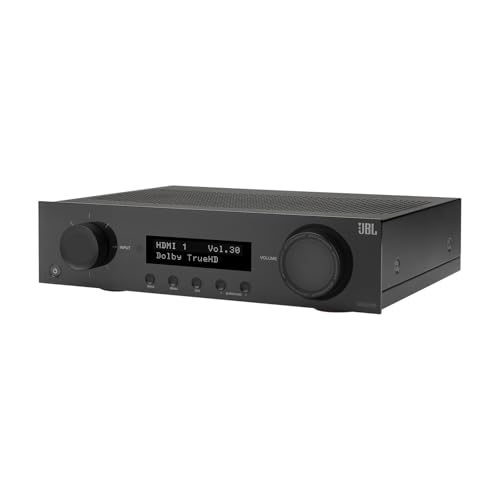
- ✓ Spectacular 8K video quality
- ✓ Easy smart home integration
- ✓ Rich, immersive sound
- ✕ Pricey for basic use
- ✕ Slight learning curve for setup
| Power Output | 75 Watts per channel (5 channels) |
| Video Resolution Support | 8K Ultra HD |
| Number of HDMI Inputs | 4 HDMI inputs |
| HDMI Output | 1 HDMI output with eARC support |
| Audio Decoding Formats | Dolby and DTS native 5.2-channel decoding |
| Wireless Streaming | Bluetooth, Apple AirPlay 2, Google Chromecast |
The moment I connected my Apple TV to the JBL MA510, I was blown away by how effortlessly it handled the 8K video signal. The clarity and detail in my favorite movies felt like I was right there in the theater, but without the crowds or overpriced snacks.
The setup was a breeze thanks to its straightforward HDMI inputs and seamless integration with my smart TV. I appreciated how quickly it recognized my streaming apps and gaming console, giving me instant access without any fuss.
The eARC feature really made a difference, making audio sync smooth and free of lag.
What truly stood out is how the receiver manages Dolby and DTS formats natively. The surround sound is rich and immersive, filling my living room and making every scene come alive.
Plus, streaming music via Bluetooth or Apple Airplay 2 is super simple—no complicated pairing or app hassle.
Design-wise, it’s sleek and unobtrusive, fitting nicely with my other tech gear. The black finish looks sharp, and the controls are intuitive.
I also noticed that the power output delivers enough oomph to drive my speakers loudly without distortion, even at high volumes.
Of course, at $659.95, it’s an investment, but the performance justifies the price. The only minor downside is that it might be a bit overkill if you’re only using it for casual TV watching.
Still, for serious home cinema lovers, it’s a game changer.
YAMAHA RX-V4A 5.2-Channel AV Receiver with MusicCast

- ✓ Excellent 4K/8K HDMI support
- ✓ Easy setup and calibration
- ✓ Robust streaming options
- ✕ App interface could improve
- ✕ Slightly bulky design
| HDMI Version and Features | HDMI 2.1 with HDCP 2.3, eARC, supports 4K60, 4K120AB, and 8K60B |
| Number of HDMI Inputs/Outputs | 4 inputs / 1 output |
| Wireless Connectivity | Wi-Fi 2.4 GHz/5 GHz, AirPlay 2, MusicCast, Spotify Connect |
| Supported Audio Formats | Dolby TrueHD, Dolby Digital, DTS-HD Master Audio |
| Video Compatibility | Dolby Vision, Hybrid-Log Gamma, BT.2020 |
| Room Calibration Technology | YPAO automatic room calibration |
As soon as I plugged in the Yamaha RX-V4A, I was struck by how seamlessly it handled my Apple TV’s 4K content. The HDMI 2.1 ports with support for 4K120 and 8K60B just make everything look stunning, especially when I’m streaming the latest shows.
It’s like my TV suddenly got a whole lot smarter and more capable.
The real kicker is the eARC support. I could easily send high-quality audio from my Apple TV directly to my receiver without any lag or fuss.
Plus, the setup was a breeze thanks to YPAO calibration, which tuned the sound perfectly to my room. I didn’t have to fuss with any complicated settings — it just worked.
Streaming music is effortless with Wi-Fi, AirPlay 2, and Spotify Connect built in. I played tunes from my iPhone and could control everything from the app or voice commands.
Talking to Alexa or Google Assistant to change the volume or switch inputs felt natural and quick.
The sound quality is impressive, with Dolby and DTS support giving movies a real cinematic feel. The interface is user-friendly, and the design is sleek enough to blend into my entertainment center.
The only hiccup? Sometimes, I wish it had a slightly better app for quick adjustments, but overall, it’s a solid choice for Apple TV users who want a versatile receiver.
What Features Should You Consider When Selecting an AV Receiver for Apple TV?
When selecting the best AV receiver for Apple TV, several key features should be considered to enhance your viewing and listening experience.
- HDMI Compatibility: Ensure the AV receiver has multiple HDMI inputs that support the latest HDMI standards, such as HDMI 2.1, to handle high-quality video and audio formats like 4K and HDR. This compatibility is crucial for seamless integration with your Apple TV, allowing for optimal picture and sound quality.
- Audio Formats Support: Look for receivers that support advanced audio formats like Dolby Atmos and DTS:X for immersive surround sound experiences. These formats provide multi-dimensional audio, making movies and music playback more engaging when paired with Apple TV.
- Streaming Capabilities: Opt for an AV receiver that includes built-in Wi-Fi and Bluetooth for easy wireless streaming from your Apple TV and other devices. This feature allows you to enjoy music and video content without the hassle of physical connections, enhancing convenience.
- Room Calibration Technology: Many modern AV receivers come with automatic room calibration technology, which adjusts audio settings based on your specific room acoustics. This feature ensures that sound is balanced and optimized, providing the best listening experience regardless of your room’s layout.
- Number of Channels: Consider the number of channels the receiver supports, as this will dictate the number of speakers you can connect. A 5.1 or 7.1 channel receiver is ideal for creating a surround sound setup, while more advanced options can handle even more channels for an enhanced audio experience.
- User Interface and Remote Control: A user-friendly interface and an intuitive remote control can significantly enhance your experience with the AV receiver. Look for models that offer easy navigation and customizable settings, making it simple to switch between inputs and adjust settings while enjoying content on your Apple TV.
- Power Output: Check the power output ratings of the AV receiver to ensure it can adequately drive your speakers. A receiver with higher power output can produce clearer sound at higher volumes, which is particularly important for larger rooms or for those who enjoy loud audio playback.
How Crucial is HDMI 2.1 for Apple TV Users?
HDMI 2.1 is becoming increasingly important for Apple TV users, especially with the release of the Apple TV 4K, which supports 4K HDR content and high frame rates. Here’s why HDMI 2.1 is crucial for enhancing your viewing experience:
-
Higher Resolutions and Refresh Rates: HDMI 2.1 supports 8K resolution and refresh rates up to 120Hz. This capability is beneficial for users with high-performance displays, ensuring that they can take full advantage of the latest video quality and fluid motion.
-
Variable Refresh Rate (VRR): VRR reduces screen tearing during fast-paced action scenes, making it especially appealing for gamers and sports enthusiasts who use Apple TV to watch live events.
-
Enhanced Audio Return Channel (eARC): This feature allows for higher-quality audio formats to be transmitted from your TV to your AV receiver. If you’re utilizing Dolby Atmos or other advanced audio formats on Apple TV, eARC is essential for optimal audio delivery.
-
Quick Frame Transport (QFT): This minimizes latency, contributing to a smoother experience when switching between content or navigating the Apple TV interface.
Selecting an AV receiver that supports HDMI 2.1 ensures not only compatibility with future devices and formats but also a more immersive multimedia experience with your Apple TV.
What Surround Sound Formats Enhance Apple TV Experience?
Several surround sound formats can significantly enhance the Apple TV experience.
- Dolby Atmos: This advanced audio format provides a three-dimensional sound experience, allowing sounds to move freely around you in a 360-degree space. With compatible AV receivers, Dolby Atmos can create an immersive environment that complements movies and games, making you feel like you’re right in the middle of the action.
- DTS:X: Similar to Dolby Atmos, DTS:X also offers object-based audio that allows for precise sound placement. It adapts to your room’s layout, ensuring that sounds come from the right direction, enhancing the realism of your viewing experience on Apple TV.
- Dolby Digital Plus: This format provides high-quality surround sound and is commonly used for streaming services and Blu-ray discs. It supports up to 7.1 channels of audio, ensuring a rich soundscape that can elevate the audio experience when watching movies or shows on Apple TV.
- PCM (Pulse Code Modulation): While not a surround sound format per se, PCM is crucial for delivering high-quality audio over HDMI. Apple TV can output multichannel PCM, enabling users to enjoy high-fidelity sound when connected to a capable AV receiver, making it ideal for music and high-definition content.
- DTS-HD Master Audio: This lossless audio format allows for studio-quality sound, which is particularly beneficial for home theater setups. When paired with a compatible AV receiver, it can deliver an immersive audio experience for content played on Apple TV, making it a great choice for audiophiles.
Which AV Receivers are Most Compatible with Apple TV?
The best AV receivers for Apple TV are those that offer seamless integration, excellent audio quality, and support for the latest video formats.
- Denon AVR-X3700H: This receiver supports Dolby Atmos and DTS:X, making it ideal for immersive home theater experiences.
- Yamaha RX-V6A: Known for its versatile connectivity options, this receiver includes support for multiple streaming services and AirPlay 2.
- Onkyo TX-NR696: With its advanced video processing and 4K upscaling capabilities, this receiver enhances the viewing experience when paired with Apple TV.
- Marantz SR6015: Renowned for its high-fidelity audio performance, this model features advanced room calibration technology for optimal sound in any environment.
- Pioneer VSX-LX504: This receiver boasts a robust set of features, including support for the latest HDMI standards and multi-room audio configurations.
The Denon AVR-X3700H is equipped with 9.2 channels of amplification and offers extensive format support, making it suitable for both music and movie enthusiasts. Its built-in HEOS technology enables streaming from various apps, while its user-friendly interface simplifies setup and operation.
The Yamaha RX-V6A stands out for its modern design and user-friendly features, such as MusicCast, which allows for multi-room audio streaming. It also supports 8K video passthrough, ensuring that it stays relevant as video technology advances.
The Onkyo TX-NR696 offers a solid balance of performance and value, with features like Dolby Atmos and DTS:X for immersive sound. Additionally, its support for various streaming services and compatibility with Apple AirPlay 2 makes it a convenient choice for Apple TV users.
The Marantz SR6015 is designed for audiophiles, delivering rich and detailed sound thanks to its high-quality components. Its automatic room calibration ensures that sound is optimized for your specific environment, providing an improved listening experience.
The Pioneer VSX-LX504 is a feature-rich receiver that supports the latest HDMI specifications, making it a great choice for Apple TV users looking for high-quality 4K content. Its advanced multi-zone capabilities allow users to enjoy different audio sources in multiple rooms simultaneously, enhancing its versatility.
How Does Room Calibration Improve Audio Quality for Apple TV?
Equalization Adjustments: Room acoustics can lead to uneven frequency responses, where some sounds may be amplified while others are diminished. Calibration systems automatically adjust equalization settings to balance these frequencies, resulting in a more natural and immersive listening experience.
Dynamic Range Optimization: Calibration enhances the dynamic range of audio output, allowing for clearer dialogue and more pronounced sound effects. This is particularly beneficial for film and television content, where subtle audio cues are critical for an engaging experience.
Room Size and Shape Considerations: Different rooms have unique sizes and shapes that can significantly affect sound quality. Room calibration takes these factors into account to tailor audio settings specifically for the environment, ensuring that the sound is well-distributed and free from problematic resonances.
What Are the Leading Brands for AV Receivers Compatible with Apple TV?
The leading brands for AV receivers compatible with Apple TV include:
- Denon: Denon AV receivers are known for their excellent sound quality and compatibility with Apple AirPlay, allowing seamless integration with Apple TV. Their models often feature advanced audio processing capabilities and support for various surround sound formats, making them a popular choice for home theater enthusiasts.
- Yamaha: Yamaha offers a range of AV receivers with features like MusicCast, which allows for multi-room audio capabilities and easy connection to Apple devices. Their receivers also provide high-quality audio performance and user-friendly interfaces, making setup and navigation straightforward for users.
- Onkyo: Onkyo receivers are well-regarded for their robust build quality and impressive sound reproduction. Many of their models support Apple AirPlay and have built-in streaming services, making it easy to connect and enjoy content from Apple TV and other devices.
- Pioneer: Pioneer AV receivers are known for their innovative technology and compatibility with Apple products, including support for Apple Music and AirPlay. Their receivers often come with advanced calibration features to optimize sound quality based on the room’s acoustics, enhancing the overall viewing experience with Apple TV.
- Marantz: Marantz is celebrated for its high-fidelity audio systems, and their AV receivers are no exception, offering exceptional sound quality and compatibility with Apple devices. With features like HEOS built-in for multi-room audio, they provide a versatile solution for integrating Apple TV into a comprehensive home theater setup.
How Do I Properly Connect My Apple TV to an AV Receiver?
To properly connect your Apple TV to an AV receiver, follow these steps:
- HDMI Connection: Use an HDMI cable to connect the Apple TV to one of the HDMI input ports on your AV receiver.
- Audio Settings: Adjust the audio settings on your Apple TV to ensure that the audio output is set to the correct format compatible with your AV receiver.
- Video Output Settings: Set the video output resolution on your Apple TV to match the capabilities of your AV receiver and display.
- Remote Control Configuration: If desired, configure your AV receiver so that it can be controlled via the Apple TV’s remote or a universal remote.
- Testing the Connection: After all connections are made, test the setup by playing content to ensure both audio and video are functioning properly.
HDMI Connection: The HDMI cable transmits both audio and video signals, making it the most efficient way to connect your Apple TV to an AV receiver. Ensure you use a high-speed HDMI cable to support high-definition video and audio formats, which are essential for optimal performance.
Audio Settings: On your Apple TV, navigate to Settings, then to Video and Audio, where you can select the audio output options. Depending on your AV receiver’s capabilities, you might choose formats like Dolby Digital or PCM to ensure you get the best sound quality during playback.
Video Output Settings: In the same Video and Audio settings menu, adjust the video output resolution to match your display’s specifications, such as 4K or 1080p. This ensures that you are receiving the best picture quality that your AV receiver and TV can handle.
Remote Control Configuration: To enhance user convenience, you can set up your AV receiver to work with the Apple TV remote or a universal remote. This can typically be done through the AV receiver’s settings, allowing seamless control of volume and input switching without needing to switch remotes.
Testing the Connection: Once everything is connected, it’s crucial to test the system. Play a video or stream content from your Apple TV to verify that both audio plays through the AV receiver and that video displays correctly on your TV. This will help ensure that all settings have been configured properly for an enjoyable viewing experience.
What Are the Best Practices for Setting Up Apple TV with an AV Receiver?
Use High-Quality HDMI Cables: The quality of HDMI cables can impact the performance of your audio and video connections. High-speed HDMI cables are recommended, particularly for transmitting 4K video, to prevent signal loss and ensure the highest fidelity in your viewing experience.
Configure HDMI CEC Settings: Enabling HDMI-CEC (Consumer Electronics Control) allows your devices to communicate with each other, simplifying the operation of your home theater system. This means you can turn on your Apple TV and AV receiver simultaneously, as well as control volume levels and playback functions from a single remote.
Set Up Audio Formats: For an enhanced audio experience, ensure that your AV receiver is capable of decoding advanced audio formats like Dolby Atmos and DTS:X. This capability allows for a more immersive sound environment, making movies and shows more engaging.
Adjust Speaker Settings: Properly calibrating your speaker settings can significantly improve sound quality. Many modern AV receivers come with automatic calibration tools that use a microphone to measure speaker distances and levels, ensuring an optimal listening experience tailored to your room’s acoustics.
Update Firmware: Keeping the firmware of both your Apple TV and AV receiver up to date is essential for maintaining compatibility and unlocking new features. Regular updates can also improve performance and fix any bugs that may interfere with your viewing experience.
Related Post: