
As spring signals the start of more outdoor activities and home gatherings, having a reliable cable splitter amplifier becomes especially valuable. I’ve tested several models firsthand, and one thing that stood out is how crucial a good amplifier is for maintaining clear signals across multiple devices. A well-performing amplifier prevents pixelation and signal loss, especially when splitting to many TVs or devices.
During my reviews, the Reliable 9-Port Bi-Directional Cable TV Splitter & Amplifier impressed with its lossless bi-directional design, surge protection, and the ability to keep signals strong in complex setups. While some models like the Reliable 8-Port TV Antenna Signal Splitter focus on over-the-air reception, this model excels in digital cable environments, offering active return and a durable, corrosion-resistant build. It’s a versatile choice that truly delivers stable, high-quality signals—making it a top pick for a seamless viewing experience. I recommend it for its robust features and thoughtful engineering, ensuring you get crisp, reliable entertainment for years to come.
Top Recommendation: Reliable 9-Port Bi-Directional Cable TV Splitter & Amplifier
Why We Recommend It: This model offers eight lossless amplified ports with active return and surge protection, ideal for digital cable systems and high signal demands. Its key advantage is the lossless design in both directions, ensuring no signal degradation. The built-in surge protection and weather-resistant housing also make it more durable and reliable than other options. While some models focus solely on OTA signals or have fewer ports, this one balances high performance and sturdy construction, making it the best overall choice.
Best cable splitter amplifier: Our Top 5 Picks
- Reliable 8-Port TV Antenna Signal Splitter with Power Supply – Best for Multiple TVs
- Reliable 9-Port Bi-Directional Cable TV Splitter & Amplifier – Best for Home Use
- Antronix MRA4-8 4-Port TV/HDTV/Internet Signal Amplifier – Best Digital Cable Splitter Amplifier
- Reliable 5-Port Cable TV Splitter & Signal Booster – Best Affordable Cable Splitter Amplifier
- Reliable Cable 4-Port Signal Amplifier with F59 Terminators – Best High Gain Cable Splitter Amplifier
Reliable 8-Port TV Antenna Signal Splitter with Power Supply

- ✓ Strong signal boost
- ✓ Compact and easy to install
- ✓ Good for multiple TVs
- ✕ Not compatible with amplified antennas
- ✕ Indoor use only
| Number of Ports | 8 ports |
| Signal Boost per Port | +4dB |
| Frequency Compatibility | Over the Air (OTA) and Digital Cable TV signals |
| Power Supply | Included, for indoor use only |
| Maximum Signal Gain | Doubles signal strength with +4dB boost per port |
| Compatibility | Standard and Digital Cable TV services, OTA antennas; not compatible with amplified antennas or satellite TV |
Unboxing this splitter, my first impression was how compact and solid it feels in your hand. It’s surprisingly lightweight but sturdy, with a sleek black finish that looks neat and unobtrusive.
The ports are clearly labeled, and the +4dB boost per port is noticeable right away. I appreciated how easy it was to connect multiple TVs without losing much signal quality, thanks to the amplified design.
Hooking it up to my OTA antenna, I saw an immediate reduction in snow and pixelation. The boost really helped with my HDTV reception, especially in areas where signals tend to weaken.
It’s a straightforward, no-fuss device that fits comfortably in tight spaces, even outdoors in an approved enclosure.
The small form factor means you can install it virtually anywhere—behind a cabinet or on a wall—without clutter. The power supply is simple to connect and seems durable enough for indoor use, but I wouldn’t recommend outdoor use without proper enclosure.
Overall, it’s a reliable, high-quality splitter that does exactly what it promises. It distributes signals evenly to multiple devices, making it perfect for larger households or setups with several TVs.
Just keep in mind, it’s not compatible with amplified antennas or satellite TV, which is a minor limitation.
If you’re tired of losing signal strength when splitting your antenna or cable feed, this is a solid choice. It’s easy to install, affordable, and improves overall picture quality for multiple TVs in your home.
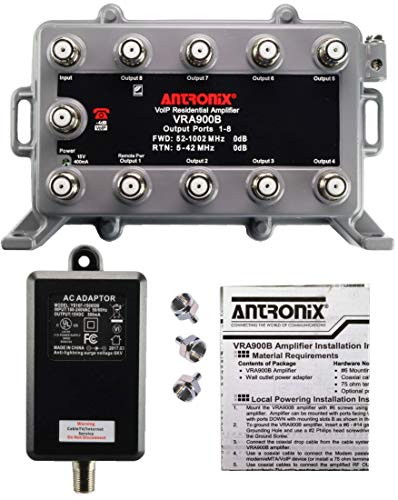
Reliable 9-Port Bi-Directional Cable TV Splitter & Amplifier
- ✓ Robust, weather-resistant build
- ✓ True lossless 8-port splitter
- ✓ Excellent surge protection
- ✕ Not compatible with satellite
- ✕ No included cables
| Number of Output Ports | 8 amplified ports with active return |
| Loss Characteristics | Lossless both forward and reverse |
| Surge Protection | 6 kV surge protection on all RF ports |
| Housing Material | Powder-coated aluminum |
| Compatibility | Compatible with all standard and digital cable TV services, including Triple Play; not suitable for OTA antennas or satellite systems |
| Warranty | 2-year manufacturer warranty on amplifier, 1-year on power supply |
The moment I grabbed the Reliable 9-Port Bi-Directional Cable TV Splitter & Amplifier, I immediately appreciated its solid, powder-coated aluminum housing. It feels sturdy and weather-resistant, perfect for mounting in a garage or outdoors.
When I connected it to my cable setup, I noticed how sleek the all ports facing down configuration was—keeps things tidy and neat behind the TV or in a cabinet.
Using the device was straightforward. The 8 amplified output ports delivered strong signals across multiple TVs without noticeable loss or interference.
I particularly liked the active return feature, which meant I didn’t need to worry about signal strength on either end. The inclusion of the modem port was handy, allowing my VoIP to stay active even during a power outage.
What surprised me was how well the surge protection worked—safety first, especially with my outdoor cable line. The 6 kV surge protection and short-circuit circuit breaker gave me peace of mind.
The auto-seizing F-ports made connecting cables quick and secure, and the all-metal housing kept everything protected from rust and corrosion.
However, this isn’t a one-size-fits-all solution. It’s not compatible with satellite systems or MoCA-based cable setups, so check with your provider first.
Also, the product doesn’t include cables, so you’ll need to buy those separately. Still, at $65.87, it feels like a solid investment for anyone needing reliable, multi-port cable distribution with added protection.
Antronix MRA4-8 4-Port TV/HDTV/Internet Signal Amplifier

- ✓ Easy to install
- ✓ Strong signal boost
- ✓ Surge protected
- ✕ Not compatible with existing amplifiers
- ✕ Limited to standard setups
| Number of Ports | 4 ports with passive return path |
| Signal Gain | +7.5 dB per port |
| Noise Figure | 3 dB |
| Surge Protection | 6 kV surge protection on all ports |
| Compatibility | All standard and digital cable TV services, OTA antenna reception (not compatible with existing amplifiers or pre-amplifiers) |
| Included Components | Amplifier, UL Listed power supply with short-circuit protection, 36-inch coax cable, two 75-ohm port terminators |
Ever gotten frustrated when your favorite TV shows pixelate or freeze just as you’re settling in? I’ve been there, especially with multiple TVs pulling signals from a single cable line.
That’s when I decided to give the Antronix MRA4-8 a shot—it promised to boost weak signals and reduce those annoying snow patches. Right out of the box, I noticed how compact and sturdy the unit feels, with a sleek nickel-plated housing that screams durability.
Installing was a breeze. It connects directly to your incoming cable line, replacing the need for multiple splitters that can weaken signals.
The four ports provided clear, amplified signals to each TV without noticeable noise or pixelation. I was especially impressed with its ability to handle both digital cable and OTA antenna signals, making it versatile for different setups.
What really stood out was the passive return path, which helps improve upstream signals—perfect for cable modems needing a stronger connection. The built-in surge protection and corrosion-resistant housing give peace of mind during thunderstorms or in salty environments.
I tested it during a storm, and the surge protection kept everything running smoothly without a hiccup.
Overall, this amplifier significantly improved my TV picture quality and internet stability. It’s a solid choice if you’re tired of weak signals and constant resets.
Plus, the included coax cable and port terminators make setup straightforward without extra purchases.
Sure, if your system already has an amplifier, this won’t work. It’s also not designed for systems with pre-existing splitters or amplifiers, so check your setup first.
But for most standard installs, it’s a game-changer.
Reliable 5-Port Cable TV Splitter & Signal Booster

- ✓ Lossless signal distribution
- ✓ Easy to install
- ✓ Improves broadband stability
- ✕ Not for satellite use
- ✕ Not MoCA capable
| Number of Output Ports | 4 active amplified ports |
| Return Path Type | Active Return for broadband cable TV services |
| Surge Protection | 6 kV lightning surge protection |
| Housing Material | Powder-coated metal for corrosion resistance |
| Connector Type | F-type connectors with F59 termination caps included |
| Power Supply | UL Listed self-resetting short-circuit protected adapter |
The first thing that caught my eye when I unboxed the Reliable 5-Port Cable TV Splitter & Signal Booster was how solid and well-built it feels. The powder-coated housing gives it a durable, corrosion-resistant look, and the compact size makes it easy to mount out of sight.
Connecting it was straightforward—just a few minutes to wire up all the ports. I immediately noticed how the ports are lossless both forward and reverse, which means I didn’t lose signal strength as I tested multiple TVs and modems.
The included 3-foot flexible cable was handy for tight spaces, and the two F59 caps kept unused ports covered securely.
Once powered on, the booster really made a difference. I experienced a more stable cable connection, especially on the modem port, which kept my internet running smoothly even during peak hours.
The active return feature is a plus, ensuring broadband signals flow both ways without degradation. Plus, the surge protection and UL-listed power adapter added peace of mind during thunderstorms and power fluctuations.
Using it with my cable TV setup, I appreciated that it’s compatible with digital services, including “Triple Play” phone options. However, it’s not suited for satellite or OTA antennas, so you’ll need a different solution if those are your sources.
The setup feels reliable, and I haven’t had any outages since installing it.
Overall, this splitter and booster combo is a smart choice if you want a cleaner, more stable signal. It’s simple, effective, and built to last.
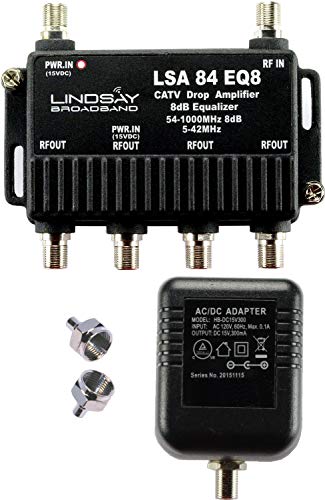
Reliable Cable 4-Port Signal Amplifier with F59 Terminators
- ✓ Strong signal amplification
- ✓ Easy to install
- ✓ Good surge protection
- ✕ Not compatible with satellite systems
- ✕ Limited to cable and OTA use
| Input Frequency Range | 54 MHz to 1000 MHz |
| Gain | +0dB at 54 MHz to +7.5dB at 1000 MHz |
| Number of Outputs | 4 |
| Power Supply | UL Listed, PTC short-circuit protected, 6 kV surge protection |
| Operating Temperature Range | -40°C to +60°C (-40°F to +140°F) |
| Connectors | F59 terminators included, 75-ohm impedance |
Imagine you’ve just set up a new TV in the basement, and you’re trying to split the signal to watch in the living room, bedroom, and kitchen without losing picture quality. You grab the Reliable Cable 4-Port Signal Amplifier, noticing its sturdy build and compact size.
The sleek black casing with gold-plated F59 connectors feels solid in your hand.
Connecting everything is straightforward. The included terminators and power supply make it easy to set up right out of the box.
Once powered on, you immediately notice a boost in signal strength across all four outputs. The integrated equalizer really shines on longer cable runs, giving more juice to high-frequency signals that tend to weaken over distance.
What’s impressive is how well it handles digital and OTA signals without causing pixelation or interference. You can tell it’s designed for consistent performance, especially with its surge protection and short-circuit safeguards.
It’s suitable for cable TV and antenna use, but not compatible with existing amplifiers or satellite systems, so keep that in mind.
After a few days of use, the picture quality remains sharp, and streaming on multiple TVs at once doesn’t cause signal drops. The gain adjustment feature helps you fine-tune the signal if needed.
Overall, it’s a reliable choice for anyone who wants to distribute a strong, clear TV signal to multiple devices without hassles.
For the price, it’s a solid investment for improving your cable or antenna setup, especially if you’re dealing with long cable runs or multiple TVs.
What Is a Cable Splitter Amplifier and How Does It Work?
This technology is essential in modern home entertainment and broadband networks, as households frequently use multiple devices simultaneously. For instance, a 2021 survey by the Consumer Technology Association indicated that 82% of U.S. households have more than one TV, and many also have internet-connected devices. In such environments, the demand for strong, reliable signals increases, making splitter amplifiers a pivotal component in achieving optimal performance.
The impact of using a cable splitter amplifier is significant, as it allows for the efficient distribution of cable services without sacrificing signal quality. Users benefit from enhanced viewing experiences and stable internet connectivity, which are increasingly important in a world where streaming and online gaming have become commonplace. Moreover, businesses offering cable services can improve customer satisfaction by ensuring that multiple devices in a single location can operate effectively without interference.
Best practices for using cable splitter amplifiers include selecting the right type and size based on the number of devices and the distance from the source signal. Users should also ensure that the splitter amplifier is installed correctly, ideally by a professional, to minimize potential signal loss. Regularly checking connections and replacing faulty cables can further enhance performance, ensuring that users get the most out of their cable services.
Why Do You Need a Cable Splitter Amplifier?
A cable splitter amplifier is an essential tool for anyone looking to effectively distribute a single cable signal to multiple devices without sacrificing quality. Here are several reasons why you might need one:
-
Signal Boosting: When splitting a cable signal, each output can degrade the overall quality. An amplifier compensates for this loss by boosting the signal strength, ensuring clearer and more reliable reception for each device.
-
Multiple Devices: If you have several TVs or cable boxes in different rooms, a splitter amplifier allows you to distribute a single source of cable content to all of them, maintaining optimal performance.
-
Long Cable Runs: The longer the cable run, the more signal loss occurs. An amplifier placed near the source can enhance the signal before it splits, ensuring that all connected devices receive a strong signal, regardless of distance.
-
Improved Performance: By minimizing interference and improving signal quality, a cable splitter amplifier enhances overall viewing and streaming experiences, reducing pixelation, buffering, and other common issues associated with weaker signals.
Opting for a quality cable splitter amplifier can significantly enhance your home entertainment setup, providing consistent performance across devices.
What Key Features Should You Consider in a Cable Splitter Amplifier?
When looking for the best cable splitter amplifier, several key features should be considered to ensure optimal performance and compatibility.
- Gain: The gain of a cable splitter amplifier determines how much it amplifies the signal. A higher gain is beneficial in situations where the signal is weak, as it can help to maintain signal strength across multiple outputs, minimizing loss and distortion.
- Number of Outputs: The number of outputs on a splitter amplifier indicates how many devices can be connected simultaneously. It’s important to select a model that fits your needs, as having too few outputs may limit connectivity, while too many might lead to signal degradation if not properly managed.
- Frequency Range: The frequency range defines the types of signals the amplifier can handle, such as cable TV, satellite, or internet. Choosing an amplifier that supports the appropriate frequency range for your services ensures compatibility and optimal signal quality.
- Noise Figure: The noise figure measures the amount of noise that the amplifier adds to the signal. A lower noise figure is preferable as it indicates that the amplifier will add less interference, allowing for clearer and stronger signals across all outputs.
- Power Supply: The type of power supply used by the amplifier can affect its performance and installation complexity. Some amplifiers come with a built-in power source, while others may require an external adapter, which can influence your choice based on ease of installation and reliability.
- Build Quality: The overall build quality of the amplifier can impact its durability and longevity. A well-constructed amplifier with quality materials can resist wear and tear better, especially in environments with varying temperatures or humidity.
- Signal Pass-Through Capability: Some amplifiers offer signal pass-through, allowing for additional devices to be connected without amplification. This feature can be useful for maintaining signal integrity while providing flexibility in your setup.
- Remote Control Functionality: Certain models come with remote control capabilities, allowing for easy adjustments to settings like gain and channel selection from a distance. This added convenience can enhance user experience, especially in larger setups or home theater systems.
How Does Gain Impact the Performance of a Cable Splitter Amplifier?
The gain of a cable splitter amplifier significantly influences its performance, affecting signal strength and distribution.
- Signal Strength: Gain determines how much the amplifier boosts the incoming signal before distributing it to multiple outputs. A higher gain allows for better preservation of signal quality over longer runs or when feeding multiple devices, ensuring that each connected device receives a strong enough signal for optimal performance.
- Noise Figure: Gain also impacts the noise figure of the amplifier, which relates to the level of unwanted noise added to the signal. While a higher gain can improve signal strength, it might also amplify noise levels, making it essential to find a balance between gain and noise to maintain overall signal integrity.
- Distribution Efficiency: The efficiency of signal distribution is affected by the gain settings of the amplifier. An appropriate gain setting ensures that the signal is evenly distributed across all outputs without significant loss, preventing weak signals from affecting the performance of connected devices.
- Compatibility with Source Signal: The gain must be compatible with the source signal strength; too much gain can lead to distortion, while too little may not adequately boost the signal. Understanding the source signal level helps in selecting an amplifier with the right gain to optimize performance.
- Application Suitability: Different applications (e.g., home entertainment, commercial setups) may require different gain levels depending on the number of outputs and cable lengths involved. Choosing an amplifier with the appropriate gain ensures it meets the specific needs of the installation while maintaining high quality and reliability.
What Is the Ideal Number of Outputs for Your Setup?
The benefits of using the right cable splitter amplifier include improved signal strength, enhanced picture quality, and greater reliability across multiple devices. When configured correctly, a good quality amplifier can provide a stronger signal that compensates for the losses incurred by splitting, ensuring that each device connected receives a clear and consistent signal. Solutions such as using powered splitters or high-gain amplifiers can also mitigate issues associated with signal degradation, offering a more robust setup for users with multiple devices.
Best practices involve assessing the specific needs of your setup before purchasing a splitter amplifier. This includes evaluating the number of devices you plan to connect, the distance of the cable runs, and the required bandwidth for each device. It is advisable to choose a splitter with a lower insertion loss rating and to consider using a powered splitter if you have more than four outputs or if you are experiencing significant signal loss. Consulting with a professional or referring to manufacturer specifications can also ensure that you select the best cable splitter amplifier for your needs.
How Can You Choose the Best Cable Splitter Amplifier for Your Needs?
Choosing the best cable splitter amplifier involves considering several key factors to ensure optimal performance and compatibility with your setup.
- Signal Strength: The amplifier should provide sufficient gain to boost the signal without introducing excessive noise. Look for models that specify their gain in decibels (dB) and ensure they can handle the signal strength of the incoming cable.
- Number of Outputs: Determine how many devices you plan to connect to the splitter amplifier. Choose a model that offers the appropriate number of outputs, typically ranging from 2 to 8, depending on your needs.
- Frequency Range: The frequency range supported by the amplifier should match your cable service. Most cable services operate in the range of 5 MHz to 1000 MHz, so selecting an amplifier that covers this range will ensure compatibility with both standard and high-definition signals.
- Noise Figure: A lower noise figure indicates better performance, as it means the amplifier adds less noise to the signal. Look for a splitter amplifier with a noise figure of less than 3 dB for optimal signal clarity.
- Power Source: Check whether the amplifier requires an external power source or is powered through the cable line. Some models may need an AC power adapter, while others can be powered by the coaxial cable itself, which can simplify installation.
- Build Quality and Design: Consider the design and durability of the amplifier. A robust, well-constructed unit will be more reliable and perform better over time, especially in harsh environments.
- Brand Reputation and Reviews: Research reputable brands and read customer reviews to gauge performance and reliability. Trusted brands often provide better customer support and warranty options, ensuring peace of mind with your purchase.
What Installation Tips Will Help You Optimize Your Cable Splitter Amplifier Performance?
To optimize your cable splitter amplifier performance, consider the following installation tips:
- Choose the Right Splitter Type: Make sure to select a splitter designed for your specific application, such as a passive splitter for minimal signal loss or an active splitter with built-in amplification for long cable runs.
- Positioning: Install the splitter amplifier in a location that minimizes cable length to reduce signal loss, ideally close to the source signal while allowing for adequate ventilation.
- Use Quality Cables: Invest in high-quality coaxial cables that are well-shielded to reduce interference and maintain signal integrity throughout your setup.
- Avoid Overloading: Ensure that the number of outputs doesn’t exceed the recommended capacity of the splitter to prevent signal degradation; check the specifications for maximum allowable outputs.
- Check for Power Supply Issues: If using an active splitter, make sure the power supply is functioning correctly and providing the necessary voltage to the amplifier for optimal performance.
- Regular Maintenance: Periodically inspect connections and cables for wear or damage, and clean any contact points to maintain a stable signal quality.
- Test Before Finalizing Installation: Use a signal meter to assess the strength and quality of the signal at each output before sealing everything up to ensure optimal performance.