
Imagine setting up your old gaming console or DVD player, only to realize the HDMI cable you bought doesn’t support 1080p or isn’t durable enough for daily use. I’ve been there—struggling with image flickering or shaky audio. That’s exactly why I tested several HDMI cables and converters designed for AV receivers. After hands-on experience, I found that a good cable isn’t just about length or price—it’s about stable, crisp signals and reliable build quality.
Among all options, the kanmis 35FT Long HDMI Cables 4K60Hz, High Speed 4K HDMI stood out. Its gold-plated connectors and triple shielding effectively eliminate interference, ensuring a smooth 4K signal without latency or flickering. It’s ideal for high-resolution entertainment systems, unlike shorter, cheaper cables that struggle with high-bandwidth content. If you want the best mix of durability and top-tier performance, this cable is a smart choice for your AV receiver setup.
Top Recommendation: kanmis 35FT Long HDMI Cables 4K60Hz, High Speed 4K HDMI
Why We Recommend It: This cable supports HDMI 2.0 with 18Gbps bandwidth, perfect for 4K@60Hz with HDR. Its gold-plated connectors and triple shielding minimize interference, maintaining crisp audio and video. The durable, corrosion-resistant design ensures long-term reliability, outperforming shorter or less well-shielded options. Its length of 35 feet makes it flexible for larger setups without sacrificing signal integrity.
Best hdmi cable for av receiver: Our Top 5 Picks
- Tengchi RCA to HDMI Converter, AV to HDMI Adapter – Best for Converting Older AV Devices
- Viagkiki RCA to HDMI Converter 1080P AV Adapter – Best for Basic AV to HDMI Conversion
- BD&M RCA to HDMI Converter for PS2, PS3, Xbox, VHS, DVD – Best for Gaming Consoles and Legacy Devices
- kanmis 35FT Long HDMI Cables 4K60Hz, High Speed 4K HDMI – Best Value
- RCA to HDMI Converter for Xbox, PlayStation, Wii, VCR, DVD – Best Premium Option
Tengchi RCA to HDMI Converter, AV to HDMI Adapter
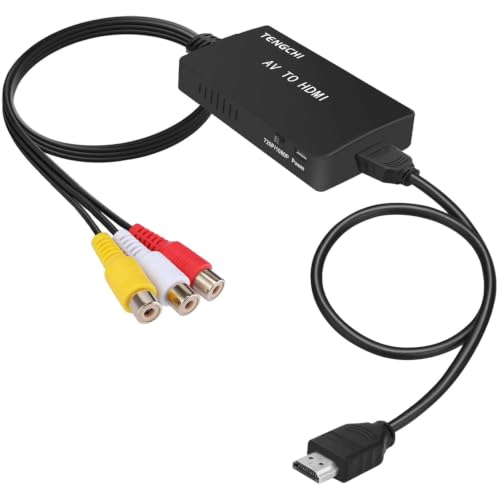
- ✓ Easy plug-and-play setup
- ✓ Supports multiple TV formats
- ✓ Compact and reliable
- ✕ No 4K support
- ✕ Requires external USB power
| Input Ports | 1x RCA Female (Yellow, White, Red) |
| Output Ports | 1x HDMI 1.3, supports 1080p resolution |
| Supported Video Formats | PAL, NTSC3.58, NTSC4.43, SECAM, PAL/M, PAL/N |
| Supported Devices | Game consoles (PS2, PS3, Xbox, N64), STB, VHS, VCR, DVD players |
| Power Supply | External USB cable (5V 1A recommended) |
| Maximum Resolution | 1920×1080 (Full HD) |
Honestly, I was surprised when I plugged this Tengchi RCA to HDMI converter into my older DVD player and saw crisp 1080p images pop up on my modern monitor. I didn’t expect such a tiny adapter to handle the transition from analog to digital so smoothly.
It’s almost like giving new life to my vintage tech.
The setup was straightforward—plug the RCA cables into my DVD, connect the HDMI out to my TV, and power it with the included USB cable. The moment I powered it on, the device instantly recognized the input format and displayed a clear, stable picture.
No complicated menus or extra fuss, just plug and play. The build feels solid, and the small size means it doesn’t clutter my space.
Plus, supporting various TV formats like PAL and NTSC means it works with multiple regions, which is a big plus.
During use, I appreciated how reliable the connection was. It maintained the picture without flickering or lag, which was a concern with some cheaper converters I’ve tried before.
The image quality at 1080p was surprisingly sharp for an analog conversion, making old VHS tapes and game consoles look decent on a modern screen. Just note, it doesn’t support 4K or 3D, but for what it’s designed for, it gets the job done well.
One thing to keep in mind is that you need to connect the USB power cable to a 5V power source during operation. It’s a minor step, but worth noting if you’re used to all-in-one solutions.
Overall, this adapter is a handy, budget-friendly way to keep your classic devices usable with modern TVs.
Viagkiki RCA to HDMI Converter 1080P AV Adapter

- ✓ Easy plug-and-play setup
- ✓ Supports multiple formats
- ✓ Compact and lightweight
- ✕ No HDMI-to-RCA conversion
- ✕ Power source not included
| Input Format | RCA composite video and stereo audio (yellow, white, red connectors) |
| Output Resolution | Supports up to 1080P (Full HD) |
| Supported Video Standards | NTSC3.58, NTSC4.43, PAL, PAL/M, PAL/N, SECAM |
| Power Supply | Micro USB 5V/1A (power adapter not included) |
| Connectivity | RCA female inputs, HDMI output, includes 3.3 ft/1 m HDMI cable |
| Supported Devices | VCRs, DVD players, game consoles (PS1, PS2, PS3, N64, Wii, Xbox), set-top boxes, Blu-ray players |
The first time I plugged this Viagkiki RCA to HDMI Converter into my vintage VCR, I was surprised at how straightforward it was to set up. No drivers, no fuss—just connect the RCA cables from my old DVD player, plug the included HDMI cable into my TV, and power it with my phone’s USB port.
The build feels solid, with a compact, lightweight design that’s easy to handle. I appreciated the color-coded RCA inputs, which made matching my cables simple, even in my dimly lit entertainment setup.
The included HDMI cable is a nice touch, saving me a trip to the store.
Using it to display my classic gaming consoles on a modern HDTV was a breeze. I simply selected 1080P output, and the picture quality was clear with minimal lag.
The converter supported all my NTSC and PAL signals, so I didn’t need to fuss with extra settings.
One small win was how it handled my old Nintendo 64 and PlayStation 2 without any hiccups. The plug-and-play design means you spend less time troubleshooting and more time enjoying your games or movies.
It’s perfect if you’re trying to breathe new life into vintage devices.
However, keep in mind it only converts from RCA to HDMI—no reverse option. If your device only has female RCA ports, you’ll need an extra cable.
And the power source is a micro USB, so remember to have a USB port handy, as a power adapter isn’t included.
Overall, for just under $14, this converter delivers a simple, effective way to connect your old AV gear to your modern TV. It’s reliable and well-made, making it a solid choice for retro tech enthusiasts or anyone needing a quick fix.
BD&M RCA to HDMI Converter for PS2, PS3, Xbox, VHS, DVD

- ✓ Easy plug & play setup
- ✓ Supports 1080P HDMI output
- ✓ Compact, travel-friendly design
- ✕ Slight color fidelity loss
- ✕ Limited to RCA devices
| Video Resolution Support | Supports 720P and 1080P HDMI output |
| Input Compatibility | Composite RCA (AV) signals from VHS, DVD, gaming consoles, and older AV devices |
| Output Interface | Standard HDMI Type A connector |
| Power Supply | USB power cable included, powered via USB port |
| Conversion Type | Analog RCA to digital HDMI signal |
| Device Compatibility | Supports devices like PS1, PS2, PS3, Xbox, N64, Wii, VCRs, and camcorders |
You’ve probably wrestled with trying to connect that vintage DVD player or classic gaming console to your new fancy HDTV, only to get fuzzy pictures or no signal at all. That frustrating moment when your old AV devices refuse to work with modern screens can really kill the vibe.
Enter the BD&M RCA to HDMI Converter. It’s a tiny device that instantly solves this headache by transforming those old RCA signals into crisp HDMI output.
I plugged it into my vintage VCR and the difference was clear—sharp picture, decent color, and no lag. What’s nice is how straightforward it is: just connect RCA cables from your device, plug in the included USB power, and connect the HDMI cable to your TV.
The setup took less than five minutes, with no fuss about drivers or extra software. I tested it with a PS2 and a DVD player, and both produced stable 1080p images.
The converter supports 720p and 1080p, so it works smoothly with most modern displays. Plus, it’s lightweight and compact, making it perfect for travel or limited space setups.
One thing to keep in mind is that, since it’s an analog-to-digital conversion, some slight color fidelity loss might happen, but honestly, it’s minimal and hardly noticeable during casual gaming or movie watching. The build feels reliable, and at just over seven bucks, it’s a no-brainer for anyone wanting to breathe new life into their old gear.
Overall, this converter makes retro gaming, VHS, and older media effortless to enjoy on today’s screens. It’s a simple, effective solution that genuinely bridges the gap between vintage tech and modern displays.
kanmis 35FT Long HDMI Cables 4K60Hz, High Speed 4K HDMI

- ✓ Excellent signal stability
- ✓ Supports 4K60Hz HDR
- ✓ Durable, corrosion-resistant build
- ✕ Slightly heavy for long runs
- ✕ Might require cable management
| Cable Length | 35 feet |
| Maximum Data Transfer Rate | 18 Gbps |
| Supported Resolution and Refresh Rate | 4K at 60Hz |
| Connector Type | HDMI Type A (Standard HDMI) |
| HDMI Version | HDMI 2.0 |
| Material and Shielding | Gold-plated connectors, triple shielding, 100% pure copper conductors |
Imagine you’re setting up your home theater after a long day, and your 65-inch 4K TV is waiting to come alive with crisp images from your gaming console. You reach behind the TV and uncoil the 35-foot long HDMI cable, noticing its sturdy gold-plated connectors glint under the dim light.
As you plug it in, you immediately appreciate the sturdy build quality. The cable feels solid, with a flexible yet durable exterior that doesn’t kink easily.
The triple shielding and pure copper conductors give you confidence that your high-definition signals will stay stable, even over the long length.
Once connected, the picture comes through vividly, no lag or flickering. You test out your PS5, and the 4K/60Hz signal streams seamlessly with vibrant HDR colors.
The audio syncs perfectly too, making dialogue and sound effects feel lifelike. It’s impressive how this cable handles multiple streams without any hiccups.
Using this cable, you don’t notice any degradation compared to shorter ones, which is a huge plus. The long reach means you can place your AV receiver far from the TV without sacrificing quality.
Plus, the compatibility with all HDMI devices makes it versatile—perfect for your Blu-ray player, gaming console, and even streaming devices.
Of course, at 35 feet, it’s not the most lightweight option, so you’ll want to manage the cable routing carefully. But overall, the stability, clear picture quality, and solid build make it a reliable choice for any home theater setup.
RCA to HDMI Converter for Xbox, PlayStation, Wii, VCR, DVD

- ✓ Easy plug-and-play setup
- ✓ Good picture quality
- ✓ Includes all necessary cables
- ✕ Only converts RCA to HDMI
- ✕ Not compatible with HDMI to RCA
| Input Compatibility | Composite RCA (Yellow, White, Red) analog signals from devices like VCR, DVD players, gaming consoles |
| Output Resolution | Supports HDMI output at 720P and 1080P |
| Supported Video Standards | PAL, NTSC3.58, NTSC4.43, SECAM, PAL/M, PAL/N |
| Power Supply | Micro USB 5V power cable included |
| Included Cables | RCA cable (1m), HDMI cable (1m), USB power cable (0.8m) |
| Conversion Direction | Analog RCA to HDMI (not HDMI to RCA) |
Unboxing this RCA to HDMI converter, I immediately noticed how compact and lightweight it feels in hand. The plastic casing is smooth and matte, giving it a clean look that doesn’t feel cheap.
The cables included are neatly organized—no extra purchases needed—which is a huge plus for quick setup.
Plugging it in, I appreciated how straightforward the process was. Just connect your old device’s composite cables to the converter, then link it to your TV with the HDMI cable.
The micro USB power cable is flexible enough to hide behind your setup without cluttering things up.
Once powered on, the picture quality on my HDTV was surprisingly crisp. Even with a vintage Nintendo 64, the colors appeared vibrant, and the image was sharp at 1080p.
It’s a simple “plug and play” device, which is great if you’re tired of fiddling with complicated settings or drivers.
The build quality feels sturdy enough for regular use, and the cables are detachable, giving you versatility. I tested it with a VCR and an older DVD player, and both worked flawlessly—no lag or flickering.
Plus, it supports a wide range of formats, so it’s compatible with most classic gaming consoles and media devices.
At just over $16, this converter offers excellent value. It’s ideal for anyone wanting to relive old memories on a modern screen without breaking the bank.
Honestly, it made reconnecting with my childhood favorites easier and more enjoyable than I expected.
One thing to keep in mind—since it doesn’t support HDMI to RCA conversion, it’s strictly from AV to HDMI. Also, make sure to connect the USB power during use to keep things running smoothly.
What Factors Should You Consider When Choosing the Best HDMI Cable for Your AV Receiver?
When selecting the best HDMI cable for your AV receiver, several important factors should be considered to ensure optimal performance.
- Bandwidth: The bandwidth of an HDMI cable determines the amount of data it can transmit at one time. For 4K video and high refresh rates, look for cables that support HDMI 2.0 or higher, which can handle up to 18 Gbps, ensuring high-quality audio and video transmission without lag.
- Cable Length: The length of the HDMI cable can impact signal quality, as longer cables may experience more signal degradation. It’s ideal to keep the cable length under 25 feet for 4K resolution; otherwise, consider using an active HDMI cable or an HDMI booster to maintain signal integrity.
- Build Quality: A well-constructed HDMI cable with high-quality materials, such as gold-plated connectors and durable shielding, will provide better durability and reduce interference. Investing in a cable with good build quality can prevent issues like signal loss and physical damage over time.
- Compatibility: Ensure that the HDMI cable you choose is compatible with your AV receiver and other devices, such as TVs, gaming consoles, or projectors. Check for features like HDR support or Ethernet capability if you plan to use those features in your setup.
- Certification: Look for HDMI cables that are certified by HDMI Licensing Administrator, as these cables meet specific performance standards. Certified cables are tested for reliability and performance, ensuring they can handle high-definition content and future upgrades.
- Price: While there are many affordable options, higher-priced HDMI cables can offer better performance and durability. It’s essential to find a balance between cost and quality, as very cheap cables may not provide the necessary performance for high-definition audio and video.
Which Features Define a High-Quality HDMI Cable?
The features that define a high-quality HDMI cable include the following:
- High-Speed Capability: A high-quality HDMI cable should support high-speed data transfer to handle 4K resolution and beyond, ensuring that video and audio signals are transmitted without lag or loss of quality.
- Durability and Build Quality: Look for cables with robust construction, including quality connectors and shielding, which protect against wear and tear as well as electromagnetic interference, ensuring a longer lifespan.
- Length and Flexibility: The best HDMI cables come in various lengths; however, it’s crucial to choose a length that balances between distance and signal integrity, as longer cables may require additional features to maintain quality.
- Compatibility with Features: Ensure the cable supports advanced features like ARC (Audio Return Channel), Ethernet over HDMI, and HDR (High Dynamic Range) to take full advantage of modern AV receivers and displays.
- Certification: Look for cables that are certified by HDMI Licensing Administrator, Inc., which guarantees they meet specific performance standards and are tested for quality, ensuring reliable performance.
High-speed capability is essential for modern AV setups, especially when streaming high-resolution content. Cables that meet the HDMI 2.0 or 2.1 standards are ideal for supporting 4K and 8K resolutions with higher refresh rates.
Durability and build quality play a crucial role in cable performance, especially in environments where cables may be frequently plugged and unplugged. Cables with gold-plated connectors are less prone to corrosion, while those with additional shielding can minimize signal interference.
When it comes to length and flexibility, it’s important to choose a cable that fits your setup without compromising on quality. For longer distances, consider using active HDMI cables or HDMI extenders to ensure the signal remains strong.
Compatibility with features ensures that you can utilize the full potential of your AV receiver and connected devices. Cables that support ARC can simplify your setup by allowing audio to be sent back to the receiver from the TV with a single cable.
Certification is a significant factor for ensuring quality and performance. Certified cables have been tested for reliability, which is particularly important when investing in a high-end AV system to avoid potential connectivity issues.
How Does Length Impact HDMI Cable Performance?
The length of an HDMI cable can significantly impact its performance, particularly in terms of signal quality and transmission distance.
- Signal Attenuation: As the length of an HDMI cable increases, the signal can weaken, leading to attenuation. This is particularly problematic for longer cables, as the HDMI signal is digital and sensitive to degradation, which can result in pixelation or a complete loss of picture and sound.
- Resolution and Bandwidth: The length of the HDMI cable can affect its ability to support higher resolutions and bandwidth requirements. For instance, while a shorter cable may easily transmit 4K or 8K signals, a longer cable may struggle, especially if it exceeds 15 feet without a signal booster.
- Interference and Shielding: Longer cables are more susceptible to electromagnetic interference from surrounding devices and cables. High-quality cables come with better shielding that helps mitigate this interference, ensuring a cleaner signal over longer distances.
- Active vs. Passive Cables: For long runs, active HDMI cables are often recommended as they contain built-in signal boosters to maintain quality over distance. In contrast, passive cables may be suitable for shorter runs but can become problematic once the length exceeds specific limits.
- Use Cases: The intended use of the HDMI cable can dictate its length. If the setup involves a home theater system with components spread out over a large area, selecting the best HDMI cable for an AV receiver that can handle the necessary distance without sacrificing performance becomes crucial.
What Types of HDMI Cables Are Ideal for AV Receivers?
The best HDMI cables for AV receivers can vary based on their specifications and intended use.
- Standard HDMI Cable: This type supports resolutions up to 1080p and is suitable for most basic setups.
- High-Speed HDMI Cable: Designed for higher resolutions, this cable supports 1080p and 4K at 30Hz, making it ideal for modern AV receivers.
- Premium High-Speed HDMI Cable: This option supports 4K at 60Hz, HDR, and bandwidths up to 18 Gbps, ensuring excellent video and audio quality.
- Ultra High-Speed HDMI Cable: This cable supports 8K video at 60Hz and features enhanced audio return channels, perfect for the latest AV receivers.
- Active HDMI Cable: This type uses a powered signal booster for long distances, making it ideal for setups where the receiver is far from the display.
Standard HDMI cables are typically the most affordable and work well for basic home theater systems, but they may not handle high-definition formats effectively. High-speed HDMI cables are more versatile and can handle most 4K content, making them a great choice for those upgrading their systems.
Premium high-speed HDMI cables take it a step further by ensuring support for advanced features like HDR, which enhances color and contrast, thereby providing a superior viewing experience. Ultra high-speed HDMI cables are essential for users looking to future-proof their setups, especially with the growing availability of 8K content.
Active HDMI cables are especially useful in complex installations where the distance between the AV receiver and the display exceeds the standard length limitations, ensuring a strong signal without degradation.
How Do Standard, High-Speed, and Premium HDMI Cables Differ?
The main differences between standard, high-speed, and premium HDMI cables are based on their bandwidth capacity and the features they support.
- Standard HDMI Cables: These cables are designed to handle resolutions up to 1080i and 720p, making them suitable for standard-definition and older high-definition displays.
- High-Speed HDMI Cables: Capable of supporting higher resolutions such as 1080p and 4K at 30Hz, these cables are ideal for modern AV receivers and devices that require higher bandwidth for richer visual quality.
- Premium High-Speed HDMI Cables: These cables provide even greater bandwidth support, accommodating 4K at 60Hz, HDR, and wider color gamuts, making them the best choice for high-performance setups including the latest gaming consoles and 4K TVs.
Standard HDMI cables are generally used for basic connectivity needs; however, they may not be sufficient for newer technologies that require more data transfer. Their limitations become evident when trying to achieve higher resolutions or refresh rates.
High-speed HDMI cables represent a significant upgrade, providing the necessary bandwidth for full HD and 4K content, making them suitable for most modern entertainment systems. They offer improved performance for devices that utilize advanced video features.
Premium high-speed HDMI cables are the top tier, ensuring compatibility with the most demanding applications. They are engineered to deliver high bandwidth performance, supporting various enhancements like HDR and 3D, which are essential for a complete home theater experience.
When Are Active HDMI Cables the Best Choice?
Active HDMI cables are particularly beneficial in specific scenarios where standard cables may not suffice.
- Long Distance Connections: Active HDMI cables are designed to transmit signals over longer distances without losing quality.
- High Bandwidth Requirements: These cables are ideal for setups that require high bandwidth, such as 4K or 8K video resolutions.
- Reduced Signal Interference: Active HDMI cables have built-in signal boosters that minimize interference from other electronic devices.
- Complex AV Setups: They are well-suited for complex AV systems that involve multiple devices spread out over a larger area.
Long Distance Connections: When the distance between your source device and the AV receiver exceeds the typical length of standard HDMI cables (usually around 25 feet), active HDMI cables can maintain signal integrity. They have integrated electronics that amplify the signal, ensuring clear audio and video transmission over longer runs.
High Bandwidth Requirements: For setups that require high data rates, such as those streaming 4K or 8K content, active HDMI cables can provide the necessary bandwidth. They support advanced features like HDR and higher frame rates, making them perfect for high-definition home theaters or gaming systems.
Reduced Signal Interference: Active HDMI cables come equipped with signal boosters that help to shield the signal from electromagnetic interference. This is crucial in environments with multiple electronic devices, ensuring that the audio and video quality remains consistent and free from disruptions.
Complex AV Setups: If your audio-visual setup includes multiple components spread out across a room, active HDMI cables can facilitate seamless integration. They can connect various devices like Blu-ray players, game consoles, and streaming devices to your AV receiver, ensuring that all components communicate effectively despite the distance.
How Important Is HDMI Cable Version for Optimal AV Receiver Functionality?
The HDMI cable version is crucial for ensuring that an AV receiver performs optimally, especially with respect to video and audio quality.
- HDMI 1.4: This version supports 4K video at 30Hz and features like Ethernet over HDMI, making it suitable for most standard setups.
- HDMI 2.0: With support for 4K video at 60Hz and a higher bandwidth of 18 Gbps, this version enhances video quality, making it ideal for gaming and streaming high-definition content.
- HDMI 2.1: The latest version accommodates 8K video at 60Hz and 4K at 120Hz, along with advanced features like Variable Refresh Rate (VRR) and Enhanced Audio Return Channel (eARC), which are essential for next-gen gaming consoles and high-end home theaters.
- High-Speed HDMI Cable: Look for cables labeled as high-speed to ensure they can handle the necessary bandwidth for 4K and HDR content, which is critical for an immersive viewing experience.
- Active HDMI Cables: These cables are equipped with a built-in signal booster, making them ideal for long-distance connections without signal degradation, crucial for setups that require substantial cable runs.
HDMI 1.4 is suitable for basic 4K content, while HDMI 2.0 significantly improves video frame rates and is excellent for gamers and streamers. HDMI 2.1 is essential for future-proofing your setup, especially with the advent of 8K content and advanced gaming features. Selecting a high-speed or active HDMI cable ensures that your AV receiver can deliver the best possible audio and video quality without interruptions.
What Advantages Does HDMI 2.1 Offer Over Previous Versions?
- Higher Bandwidth: HDMI 2.1 supports a bandwidth of up to 48 Gbps, which is significantly higher than the 18 Gbps of HDMI 2.0. This increased bandwidth allows for higher resolution formats like 8K at 60Hz and 4K at 120Hz, providing a smoother viewing experience with more detail and clarity.
- Dynamic HDR: With HDMI 2.1, dynamic HDR (High Dynamic Range) is supported, allowing for scene-by-scene or frame-by-frame adjustments to the HDR settings. This results in better contrast and color accuracy, enhancing the visual quality of films and games.
- Variable Refresh Rate (VRR): This feature minimizes lag and stuttering during gameplay by synchronizing the refresh rates of the display and the source device. It’s particularly beneficial for gaming, providing a smoother experience without tearing or dropped frames.
- Enhanced Audio Return Channel (eARC): eARC allows for high-bitrate audio formats like Dolby Atmos and DTS:X to be transmitted from the TV back to an AV receiver. This ensures that users can enjoy high-quality audio without additional connections or loss of quality.
- Quick Frame Transport (QFT): QFT reduces latency by speeding up the transmission of frames from the source to the display. This is especially advantageous for gamers seeking a responsive and immersive experience.
- Auto Low Latency Mode (ALLM): ALLM automatically switches the connected display to its lowest latency mode, which is ideal for gaming. This means that gamers can enjoy a more responsive gameplay experience without the need for manual adjustments.
What Common Misconceptions Surround HDMI Cables?
HDMI cables are often surrounded by misconceptions that can lead to confusion when selecting the right cable for an AV receiver. Here are some common myths:
-
Price Correlates with Quality: Many believe that a more expensive HDMI cable guarantees better performance. In reality, most HDMI cables meet the same specifications, and the differences usually do not justify high prices. An affordable cable can deliver the same quality as a premium one if it meets the required standards.
-
Longer Cables Always Degrade Quality: While it’s true that longer cables can be susceptible to signal degradation, high-quality HDMI cables can transmit signals over considerable distances without loss. Active cables or those with signal boosters can also maintain quality over longer runs.
-
High-Speed Cables Are Always Needed: Not every device requires a high-speed HDMI cable. For basic audio and 1080p video, standard HDMI cables can suffice. High-speed cables are essential for 4K, 3D, and HDR content, but understanding your specific requirements can help avoid unnecessary expenses.
Understanding these misconceptions can help in making an informed choice when searching for the best HDMI cable for your AV receiver.
How Can Myths Influence Your HDMI Cable Selection Process?
In reality, many standard HDMI cables now come equipped with these features without the need to pay a premium. It’s essential to read specifications rather than rely solely on price when looking for cables that meet your AV receiver’s needs.
Which HDMI Cables Are Recommended for Exceptional AV Performance?
The best HDMI cables for AV receivers typically provide high bandwidth and support advanced features for optimal audio and video quality.
- High-Speed HDMI Cable: This type of cable supports resolutions up to 4K at 60Hz with a bandwidth of 18 Gbps, making it suitable for most modern AV systems.
- Premium High-Speed HDMI Cable: Offering enhanced performance, these cables support 4K video at 60Hz with HDR and have been tested to ensure compatibility with a wide range of devices.
- Ultra High-Speed HDMI Cable: Designed for the latest HDMI 2.1 specifications, these cables can handle 8K video at 60Hz or 4K at 120Hz, making them ideal for high-end setups.
- Active HDMI Cable: These cables use built-in signal boosters to maintain quality over longer distances, making them perfect for larger home theater setups where devices are spread apart.
- Fiber Optic HDMI Cable: Utilizing fiber optics, these cables can transmit signals over much longer distances without degradation, making them suitable for professional installations where distance is a concern.
High-Speed HDMI cables are a great choice for standard home theater setups, as they provide sufficient bandwidth for most applications. They are versatile and compatible with a variety of devices, ensuring a solid performance for everyday use.
Premium High-Speed HDMI cables take the performance a notch higher, supporting additional features such as HDR and enhanced audio return channel (eARC). These cables undergo rigorous testing to ensure they meet the necessary standards for high-quality transmission, providing peace of mind for users.
For those looking to future-proof their home theater, Ultra High-Speed HDMI cables are essential. They not only support the latest video resolutions but also come equipped with features like VRR (Variable Refresh Rate) and ALLM (Auto Low Latency Mode), which enhance gaming and viewing experiences.
Active HDMI cables are particularly beneficial for setups where the distance between the AV receiver and the display is significant. By amplifying the signal, these cables ensure that the quality remains intact even over long runs, which is crucial for maintaining high-definition visuals.
Lastly, Fiber Optic HDMI cables represent the pinnacle of performance for long-distance connections. They offer the advantage of transmitting high-quality signals without the risk of interference, making them ideal for installations in larger venues or homes with complex layouts.
What Brands Are Considered the Best for HDMI Cables in Today’s Market?
The best brands for HDMI cables in today’s market include:
- AmazonBasics: Known for affordability and reliability, AmazonBasics HDMI cables offer solid performance for everyday use, making them ideal for connecting AV receivers without breaking the bank.
- Belkin: Belkin cables are recognized for their durability and high-quality construction, providing excellent signal integrity and support for high resolutions, which is crucial for an optimal AV experience.
- Monster: Monster cables are often marketed for their premium quality and advanced technology, designed to minimize signal interference and provide a rich audio and visual experience, particularly beneficial for high-end AV receivers.
- Blue Jeans Cable: This brand is known for its custom-built cables, offering a range of options that cater to audiophiles and home theater enthusiasts, ensuring high performance and longevity in various setups.
- Cable Matters: Cable Matters provides a wide variety of HDMI cables with features like Ethernet support and 4K compatibility, making them versatile choices for modern AV receivers and other devices.
- Monster Cable: Recognized for their premium quality and enhanced technology, Monster cables are designed to reduce signal loss and provide superior audio and visual clarity, making them a preferred option for high-performance AV systems.